Site or System? Two Different Builds
Nearly every consultation starts with “I need a website.” Two very different things hide inside that sentence — and the price is not close. Here is how to tell them apart before you scope.
Umam Digitals
2 September 2026
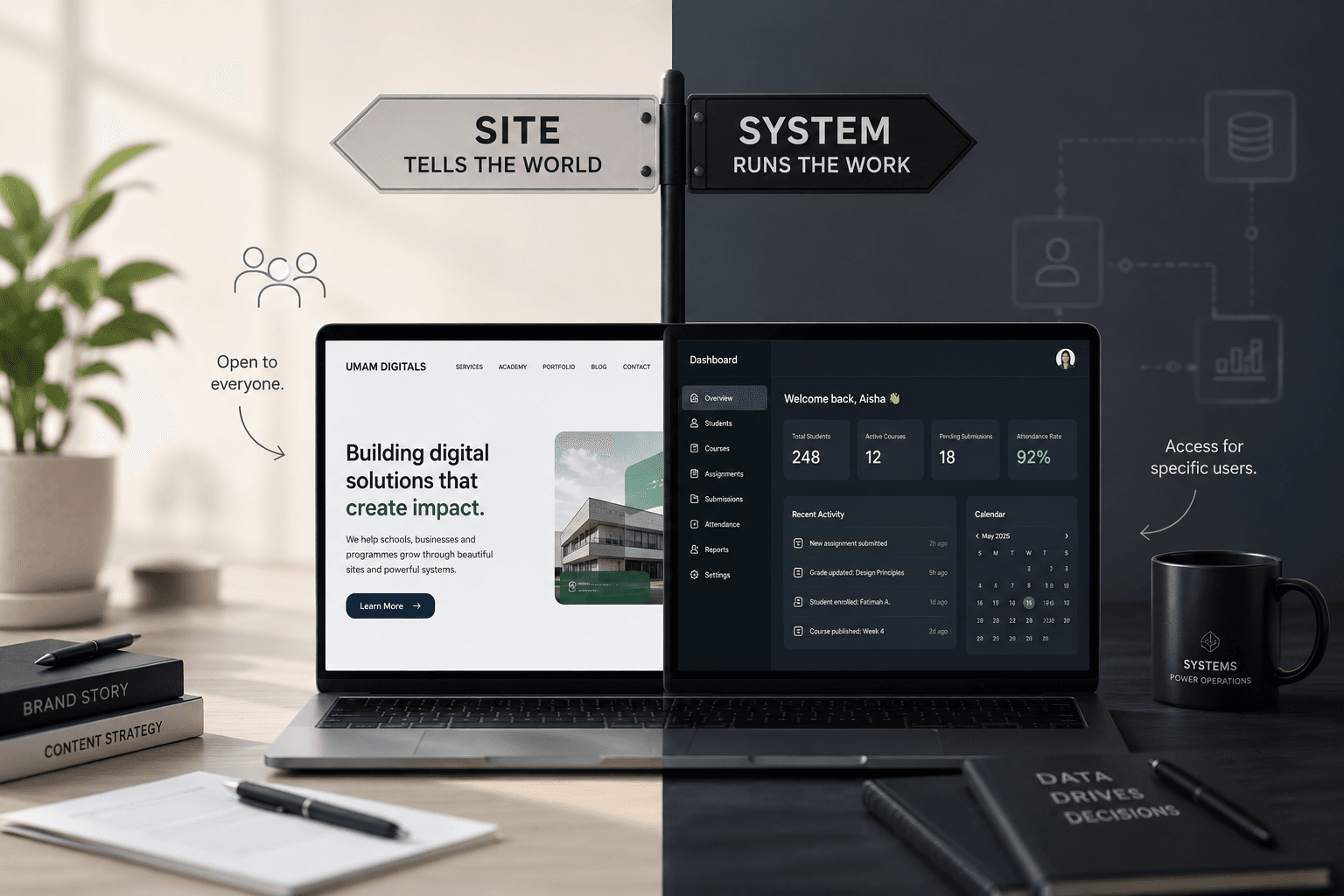
Nearly every consultation starts the same way: “I need a website.” Almost always, two very different things are hiding inside that sentence — a website that tells people about you, and a system that runs part of your operation. They cost differently, take different amounts of time, and are used by completely different people.
The line that separates them
Ask one question: does anyone need to log in?
If everything on the screen is meant for the general public — anyone with the link, no account, no password — you are describing a website. If some of what happens on the screen belongs to a specific person, and only that person may see or change it, you are describing an application.
The website that tells — open to everyone
A brand or programme site. Its job is to inform, convince, and get you contacted.
| Who uses it | Strangers. Prospective parents, customers, students, partners. |
| What is on it | Who you are, what you offer, proof, prices, FAQ, a way to reach you. |
| What it produces | Enquiries, calls, registrations, credibility when someone Googles you. |
| Content changes | Occasionally — new session, new cohort, new photos. |
| Build shape | Pages, copy, images, SEO, a contact form. Weeks, not months. |
The system that does — login required
An LMS, portal, dashboard, or app. Its job is to carry out work that used to be done by hand.
| Who uses it | People you already know, with accounts: staff, teachers, students, parents, members. |
| What is on it | Their data. Lessons, submissions, attendance, results, payments, roles. |
| What it produces | Saved hours, fewer errors, searchable records, work that continues without you. |
| Content changes | Every single day, by the users themselves. |
| Build shape | Accounts, roles, database, rules, notifications, backups, support. Months, and it grows. |
Three of ours, side by side
- umamdigitals.com — brand website, public. Everything about Umam Digitals as a company: services, portfolio, academy, blog, careers, contact. It sells the brand. Nobody logs in.
- umam-designher.vercel.app — programme website, public. One product with its own site: the 10-week DesignHer course for Muslimah. Curriculum, benefits, sample projects, testimonials, FAQ, “Join Cohort 3”. It exists to fill the cohort.
- designher-lms.vercel.app — learning platform, accounts. Where the cohort that registered actually studies. Students sign in to take lessons and submit work; tutors sign in to publish modules and track progress. Same programme as above — a completely different build.
Two of those are marketing. One is operations. A client who asks for “the DesignHer website” could mean either, and the price is not close.
The same split, in your sector
| You run a… | Public site — tells | System — does |
|---|---|---|
| School | About the school, curriculum, fees, admission requirements, gallery, calendar, news, enquiry form. | Student records, CBT and result computation, report cards, attendance register, fee invoices, parent portal, staff accounts. |
| Madrasah | The manhaj, the teachers, class times, location, fees, how to enrol, sponsorship appeals. | Ḥifẓ progress per student, sabaq and murāja'ah logs, attendance, tilāwah recordings, ijāzah records, parent updates. |
| Business | Services, portfolio, pricing, testimonials, coverage areas, WhatsApp and contact. | Orders and inventory, invoicing, customer records, bookings, delivery tracking, staff dashboard, reports. |
| Programme or cohort | What it teaches, who it is for, dates, tutors, outcomes, registration. | The LMS: lessons, assignments, submissions, grading, certificates, alumni access. |
| Association or masjid | Objectives, activities, executives, events, donation details. | Member register, dues and payment history, event check-in, members-only announcements. |
Which one are you asking for?
Start with a website if…
- People say they cannot find you online, or they only find your Instagram.
- You keep sending the same explanation, price list, or address in DMs.
- You want to look established when someone searches your name.
- The main thing you need is more enquiries, admissions, or registrations.
- Nothing on the screen would be private to one person.
You need a system if…
- You are tracking people in exercise books, WhatsApp groups, or Excel and it is breaking.
- Different people should see different things — a parent must not see another child's record.
- Something must be recorded daily: attendance, submissions, payments, progress.
- You are the bottleneck; work stops when you are unavailable.
- You need to search history or produce a report at the end of a term.
Most people need both — in this order
- The public site goes live first. Faster, cheaper, and it starts working immediately.
- Then the smallest useful version of the system. Not every feature you can imagine — the one or two things that hurt most, built properly for real users.
- Then it grows with you. Payments, parent access, reports, mobile app — added once the first version has proven itself in a real term, with real people.
What this changes about cost and time
A website is a finished thing. A system is a living one — it holds data that must never be lost, it has users who will need help, and it changes as your rules change. That difference, not page count, is what moves a quote.
So when we scope, we are not asking “how many pages?” We are asking: who logs in, what must be recorded, and what must never be seen by the wrong person.